Clams has been rebuilt from the ground up. This is Bitcoin accounting infrastructure you can deploy, integrate, and build on.
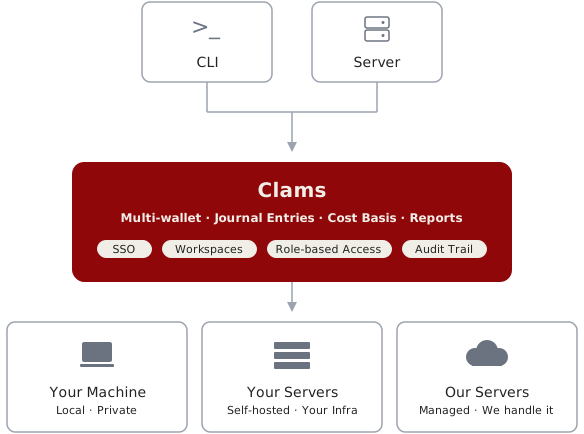
TLDR: Core logic fully rewritten with huge performance gains. One binary, two interfaces — CLI and Server. Run Clams locally or deploy anywhere. Clams Cloud available as an optional hosted backend.
The New Foundation
The core logic that powers Clams has been entirely rewritten in Rust. You'll notice huge performance improvements, especially for nodes with millions of transactions. You can read more about why we made this decision in our vision post.
With v1 beta, you install one binary and choose how to use it:
- CLI (default): Run clams init to get started. Built for automation, scripting, and AI agents. Pipe outputs to other tools, chain commands together, or hand control to Claude Code, Codex, or Open Code. Data is stored locally by default, and you can connect to Clams Cloud when you need remote access. Learn more.
- Server: Run clams setup to self-host your Bitcoin accounting data with full sovereignty. Deploy anywhere, expose REST API and CLI access to your team, lock down sensitive data, maintain complete control. View this guide to get started. Browse the API docs here.
We also offer Clams Cloud as an optional backend for the CLI. It's a public Clams Server instance we run for convenience. The CLI defaults to your local backend, and you can connect to the Clams Cloud server by running clams backends use cloud in your terminal. Clams Cloud is limited to 1 workspace and 1 profile.
New Features
Most Requested
We compiled all of your feature requests and are happy to announce the following additions:
- Connect your own node — use your Electrum server, Esplora server, or Bitcoin RPC running on Start9, Umbrel, or elsewhere. Full Tor support.
- Full audit records — view canonical records (invoices, payments, trades, UTXOs, etc.) for audits and historical backups.
- Built-in feedback — submit bugs, feature requests, or general feedback directly from the CLI or API.
- Exchange rates — check rates in 19 fiat currencies: USD, EUR, JPY, GBP, CNY, AUD, CAD, CHF, HKD, NZD, SEK, KRW, SGD, MXN, INR, BRL, NOK, ZAR, and DKK.
- Address tracking — create a connection and provide one or many on-chain addresses, or import a CSV of addresses. Track addresses without adding the xpub for a wallet.
- Direct Core Lightning sync — connect to your CLN node directly, no websocket proxy required.
- Lightning node data upload — upload raw data for your Lightning node, no active connection required. Useful for offline or decommissioned nodes. Keep your complete Bitcoin history unified and accessible.
- Custom wallet — upload wallet data in JSON or CSV format. Create a field mapping once, then reuse it for every import. Great for exchanges or wallets we don't support directly yet. Pro tip: use an LLM to generate the mapping for you. Phoenix wallet exports supported now, with more coming soon.
Enterprise-Ready
Clams now has everything you'd expect from enterprise software.
- Workspaces and profiles: A workspace is your top-level organizational unit. Profiles live inside workspaces and each profile isolates its own user data. You can have multiple of each (e.g., one workspace with separate profiles for personal and business). Invite and manage team members at the workspace level. When you start the CLI for the first time, you'll create both.
- Role-based access: admins at the root, granular permissions below. Maybe you're an accounting firm with 15 clients. You want one employee to manage 3 of them with full write access. Another client's CFO needs read-only access to their reports. That's all possible now.
- Audit trail: archived raw Bitcoin data alongside your journals. If there's ever an issue with entries or reports, you can review the source data directly. Especially useful for Lightning node operators.
Getting Started
Install Clams:
macOS / Linux
curl -sSL https://clams.tech/install.sh | shWindows
powershell -c "irm clams.tech/install.ps1 | iex"We have a new auth layer built into Clams. Sign in with Google, Apple, or a magic link sent to any email. No passwords to remember. For a guided walkthrough of login, setup, and workspace/profile creation, run:
clams initFor a full list of commands, run clams --help. Here are the most important:
- connections — add and sync your Bitcoin connections
- journals — manually process journals after syncs
- metadata — add notes, tags, and other metadata to transactions
- reports — generate reports like capital gains and balance sheet
Join the Beta
The legacy desktop app is now deprecated. Everything it did and more is available through the CLI and Server. Thank you to everyone who tested the desktop app and shared feedback. All of it helped shape this release.
This is a public beta. Whether you're using the CLI or API, we'd appreciate your help battle testing the new codebase. Your feedback directly informs what ships in v1.
Run into issues? Use the built-in feedback functionality in the CLI or API, or reach out at support@clams.tech.
Interested in enterprise licensing? Request a demo.
Clams Team